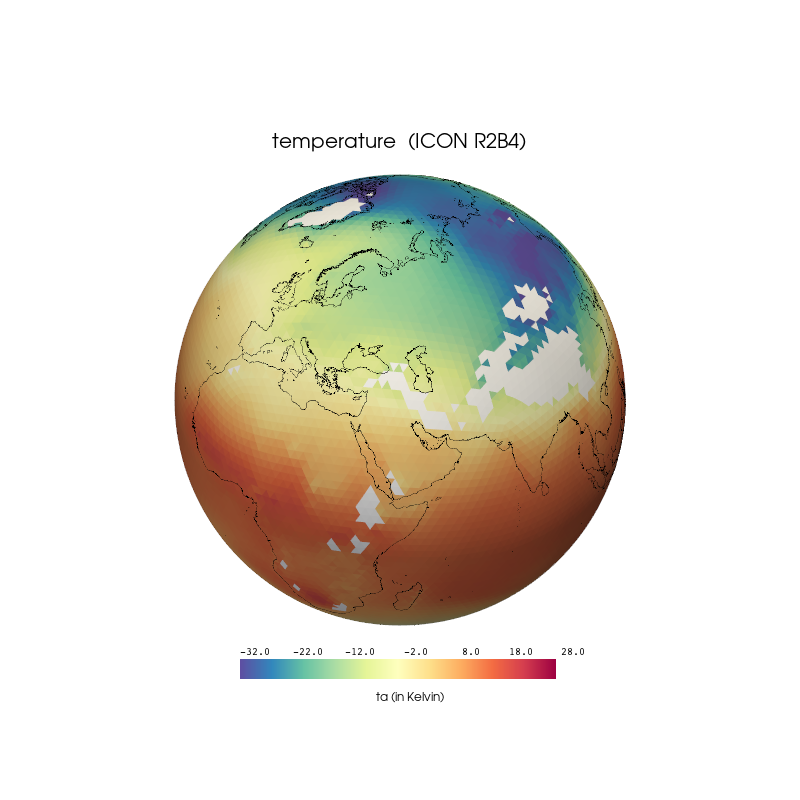
Python: PyVista - ICON on sphere#
Description
In this example we show how to visualize ICON R2B4 temperature data on a 3D-sphere using the package PyVista an GeoVista.
The clon_vertices (clon_bnds) and clat_vertices (clat_bnds) coordinate values are used to compute the vortex which is needed for the transformation from the unstructured grid to the 3D-mesh.
Content
Download coastlines
Example data
Plotting - Using the defaults for the scalarmap - default (horizontal) - default (vertical) - scalarbars properties - rotate scalarbar title string - change scalarbar background color - get and set scalarbar properties - two horizontal scalarbars next to each other
Software requirements
Python 3
numpy
xarray
pyvista
geovista
Example script#
pyvista_ICON_sphere.p
#!/usr/bin/env python
# coding: utf-8
#
#------------------------------------------------------------------------------
#-- DKRZ example: ICON on sphere
#--
#--
#-- In this example we show how to visualize ICON R2B4 temperature data on a
#-- 3D-sphere using the package `PyVista` an `GeoVista`.
#-- The `clon_vertices (clon_bnds)` and `clat_vertices (clat_bnds)` coordinate
#-- values are used to compute the vortex which is needed for the transformation
#-- from the unstructured grid to the 3D-mesh.
#------------------------------------------------------------------------------
#
# 2026 copyright DKRZ licensed under CC BY-NC-SA 4.0 (https://creativecommons.org/licenses/by-nc-sa/4.0/deed.en)
#
#------------------------------------------------------------------------------
import os
import pyvista as pv
import geovista as gv
import xarray as xr
import numpy as np

#------------------------------------------------------------------------------
#-- The temperature data and its grid variables are stored in different files.
#-- First, we have a look at the data and the coordinates needed.
#------------------------------------------------------------------------------
fname = os.environ['HOME'] + '/data/ICON/ta_ps_850.nc'        #-- data file
gname = os.environ['HOME'] + '/data/ICON/grids/r2b4_amip.nc'  #-- grid file

ds_data = xr.open_dataset(fname)
ds_grid = xr.open_dataset(gname)

#-- variable name
varname = 'ta'

#-- have a look at the different shapes
print(f'variable:       {ds_data[varname].shape}')
print(f'vlon/vlat:      {ds_grid.clon_vertices.shape}, {ds_grid.clat_vertices.shape}')
print(f'vertex_of_cell: {ds_grid.vertex_of_cell.shape}\n')
print(ds_data[varname].attrs['standard_name'])

#------------------------------------------------------------------------------
#-- Read the vertices
#--
#-- clon_vertices:  center longitude vertices
#-- clat_vertices:  center latitude vertices of the triangle vertices in radians
#------------------------------------------------------------------------------
clon_vert = np.degrees(ds_grid.clon_vertices)
clat_vert = np.degrees(ds_grid.clat_vertices)

clon_vert.attrs['units'] = 'degrees'
clat_vert.attrs['units'] = 'degrees'

#-- Convert the temperature data from °K to °C.
var = ds_data[varname].isel(time=0).squeeze()
var = var - 273.15

print(var)

#------------------------------------------------------------------------------
#-- Create the mesh
#--
#-- Use geovista's `Transform.from_unstructured` method to generate the mesh.
#-- Create the vortex of the cells that is used for the transformation from
#-- unstructured to the mesh.
#------------------------------------------------------------------------------
voc = ds_grid.vertex_of_cell.T.values - 1

mesh = gv.Transform.from_unstructured(clon_vert, clat_vert, data=voc)

#-- add the variable ta's data values to the mesh
mesh.cell_data['ta'] = var.values
mesh.set_active_scalars('ta', preference='cell')

#------------------------------------------------------------------------------
#-- Plot the unstructured mesh
#------------------------------------------------------------------------------
#-- Choose the data minimum and maximum values for coloring the cells.
var_min = -32.
var_max = 28.

#-- Choose a colormap.
cmap = 'Spectral_r'

#-- create the GeoPlotter object
plotter = gv.GeoPlotter(window_size=(800,800))

#-- change font type to arial
pv.global_theme.font.family = 'arial'

#-- scalarbar settings
sbar_args = dict(title=' ',
                 interactive=False,
                 vertical=False,
                 title_font_size=16,
                 label_font_size=10,
                 font_family='courier',
                 n_labels=7,
                 outline=False,
                 width=0.4,
                 height=0.07,
                 position_x= 0.3,
                 position_y= 0.15,
                 fmt='%10.1f')

#-- add mesh to the plotter object
actor = plotter.add_mesh(mesh, cmap=cmap, nan_color='white', scalar_bar_args=sbar_args)
actor.mapper.scalar_range = var_min, var_max

#-- draw colorbar title below the colorbar
plotter.add_text('ta (in Kelvin)',
                 viewport=True,
                 position=(0.47, 0.12),
                 font_size=6)

#-- add coastlines
plotter.add_coastlines(color='black')

#-- add title string
plotter.add_text(f'{ds_data[varname].attrs["standard_name"]}  (ICON R2B4)',
                 viewport=True,
                 position=(0.34, 0.81),
                 font_size=10)

#-- light settings
light = pv.Light()
light.set_direction_angle(0, 0)     #-- +x-direction
light.intensity = 0.2               #-- set light intensity to x%
plotter.add_light(light)

#-- save the plot
plotter.save_graphic('plot_pyvista_ICON_sphere_ta_1.pdf')

#-- show the plot and discard the plotter object
plotter.show(screenshot='plot_pyvista_ICON_sphere_ta_1.png')
Plot result#